

SSO authentication · Microsoft Entra ID One identity. The same high standards. Everywhere.
Connect Kidizz to Microsoft Entra ID so your professionals access the platform with their corporate identity. This connection simplifies access, reduces password-related risks and lets you manage access consistently with your existing security policies.
See Kidizz in actionPersonalised 30-min demo · No commitment



- SecureEncrypted, secure protocols
- Centralised identitiesUser management centralised in Entra
- Centralised securityBenefit from security managed by Microsoft
- Single sign-onFewer passwords to manage
Why SSO?
Kidizz joins your environment. Without adding another directory.
SSO brings Kidizz in line with your IT standards: identity stays managed in Microsoft Entra, while Kidizz keeps its role as a business application with its own functional permissions.
Your security rules stay yours
Microsoft Entra can apply MFA, conditional access and other controls according to the policies set by your organisation.
Identity governed in one place
Your corporate directory remains the reference for employee identity. Kidizz does not become a parallel directory.
Designed for structured organisations
An approach suited to local authorities, associations and networks that want to align Kidizz with their access standards.
A simpler sign-in
With SSO enabled, professionals use their usual Microsoft identity instead of managing an extra Kidizz password.
User experience
Less friction at sign-in. More consistency for IT.
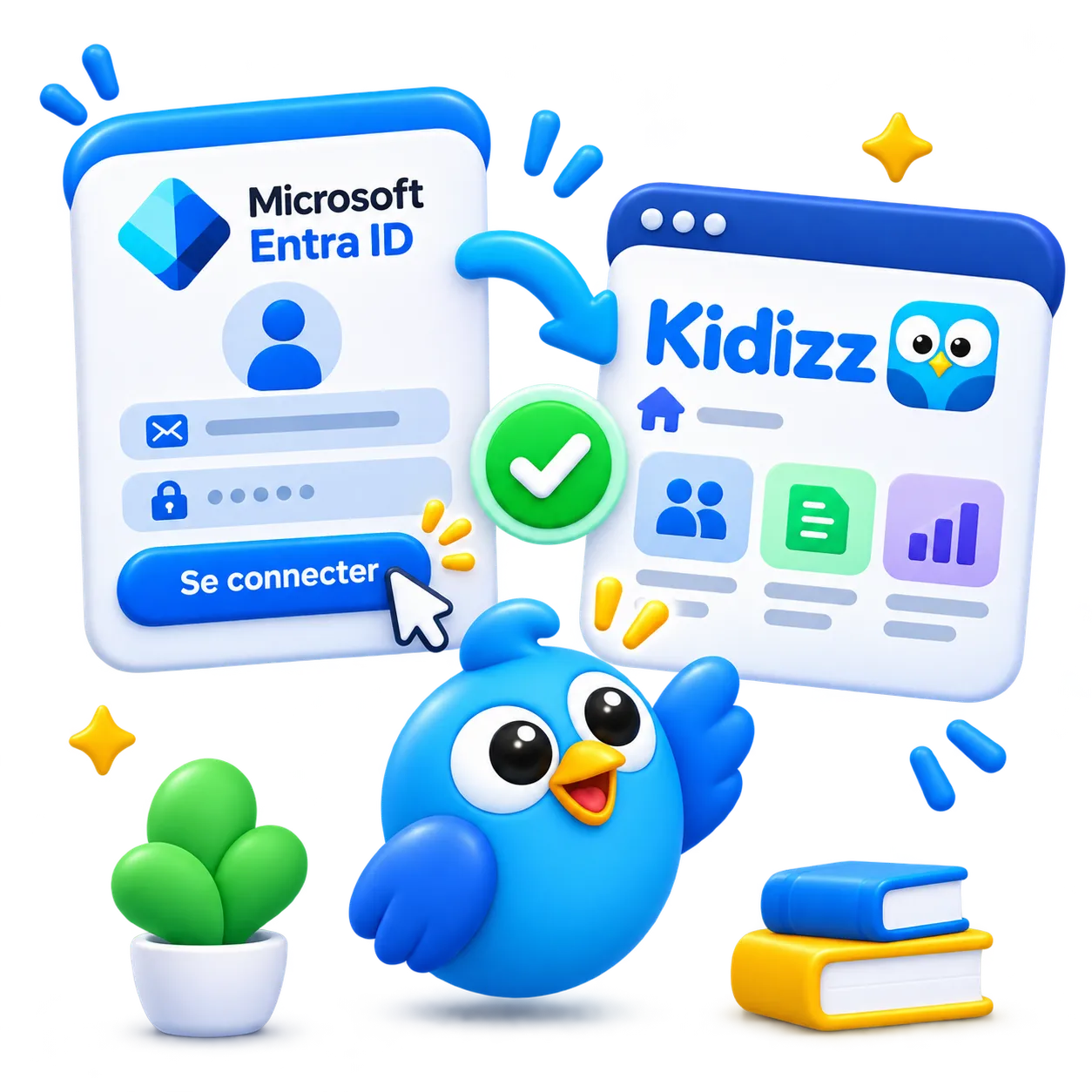
Users start from Kidizz, authenticate with Microsoft Entra, then return to the app with their identity validated.
Open Kidizz
The user chooses to sign in with their work account.
Authenticate in Microsoft Entra
The controls defined by your organisation are applied by your identity provider.
Find their Kidizz scope
Kidizz then applies the business permissions set for the user.




Professional identity
No social login. A corporate identity.
For this SSO offer, Kidizz favours Microsoft Entra ID to integrate with the customer’s professional identity system.
The goal: avoid adding consumer identity providers to employees’ sign-in journey and keep governance within your Microsoft environment.
SSO rollout
A short project, scoped with the right teams.
SSO is an identity matter. The rollout therefore brings together Kidizz, your project team and your Microsoft Entra administrator.
Scope
Define user groups, scope and expected rules.
Configure
Set up the application in your Entra environment.
Map
Match identities to Kidizz users and roles.
Test
Validate sign-in and access-denied scenarios.
Roll out
Gradually open the SSO journey to professionals.
Who is it for?
A different benefit for each team.
SSO simplifies the user experience while giving IT teams and management a more consistent framework.
IT department
Access aligned with your standards
You keep Microsoft Entra as your central identity platform and apply your existing access policies.
Management & networks
Less friction during rollout
Kidizz fits better with the way employees already work, especially in large organisations.
Professionals
A more natural sign-in
A work account already used every day is all it takes to start the Kidizz sign-in journey.
They use Kidizz every day
See how nurseries, holiday clubs and camp organisers use Kidizz.


“Rolling out Kidizz was very simple and efficient”
Junior and Anne-Laure Noubissi
Read the case study
Founders / La cabane d’Achille & Camille


“Kidizz has revolutionised how we communicate with parents”
Justine Bernagou
Read the case study
Marketing and Communications Manager

“Kidizz helps build a relationship of trust and enrich daily handovers...”
Linda Boisseau
Education & Urban Policy Officer
“Kidizz has brought us an innovative human and technological dimension.”
Julie Royer
Communications & Marketing Manager

“With Kidizz, we share the highlights of our multisensory approach to learning...”
Claudia Kespy-Yahi
Founder



“...real-time updates, creating an immersive and transparent experience.”
Benoît Maury
Read the case study
Managing Director
“A very friendly team, highly professional and just as responsive...”
Laurent Gsell
Read the case study
Regional Manager - Moselle

“Kidizz complements our relationship and exchanges with families...”
Hélène Darras
Read the case study
Head of Leisure Activities“Kidizz helps build a relationship of trust and enrich daily handovers...”
Linda Boisseau
Education & Urban Policy Officer


“Kidizz is an indispensable tool for us...”
Willy Quentel
Read the case study
Head of Holidays, Accoord

“Overwhelmingly positive feedback from parents...”
Stéphane Bourrier
Read the case study
Customer Experience Director


“...very easy to use, for families and staff alike!”
Elsa Quévreux
Read the case study
Communications and Marketing Manager

FAQ
The questions your IT department and teams will ask.
Short answers to scope the project before the technical setup.

Why Microsoft Entra ID?
Because it is the identity platform already used by many local authorities, associations and networks. By connecting to it, Kidizz joins your professional identity system: your directory remains the reference and your access policies apply, with no parallel directory.
Does SSO replace Kidizz permissions?
No. Microsoft Entra ID verifies the professional’s identity; Kidizz then applies its own business permissions, according to the role and scope set for the user.
Are Google or Facebook available for this SSO?
No. For this offer, Kidizz relies solely on Microsoft Entra ID, so that users sign in with a corporate identity and no consumer identity providers are added to employees’ sign-in journey.
Can MFA be enforced?
Yes, from Microsoft Entra: multi-factor authentication, conditional access and the other controls configured by your organisation apply when signing in to Kidizz.
Is SSO intended for families?
No. SSO is for your organisation’s professionals. Families keep accessing the Kidizz app with their own login details.

What if we made your day easier?
Discover Kidizz in 30 minutes
Personalised 30-min demo · No commitment